

We wish to acknowledge this land on which the University of Toronto operates. For thousands of years it has been the traditional land of the Huron-Wendat, the Seneca, and the Mississaugas of the Credit. Today, this meeting place is still the home to many Indigenous people from across Turtle Island and we are grateful to have the opportunity to work on this land


Ricoh MFP Setup
Installation instructions: RICOH Colour Multi-Fuction Printer
If you have any issues during the installation, please contact: stipe.milisa@dunlap.utoronto.ca
Please note the locations and IP addresses:
Ricoh IM C3000: MP Printer Room 1212B, 128.100.88.13
Ricoh IM C4500: AB Mailroom 101-J, 128.100.89.228
Instructions for Windows Users
Ricoh IM C4500/IM C3000
- Download the the driver: IM C4500 IMC3000
- Open the download and run the .exe file, It will then open Winzip self extractor, simply click “Unzip”

-
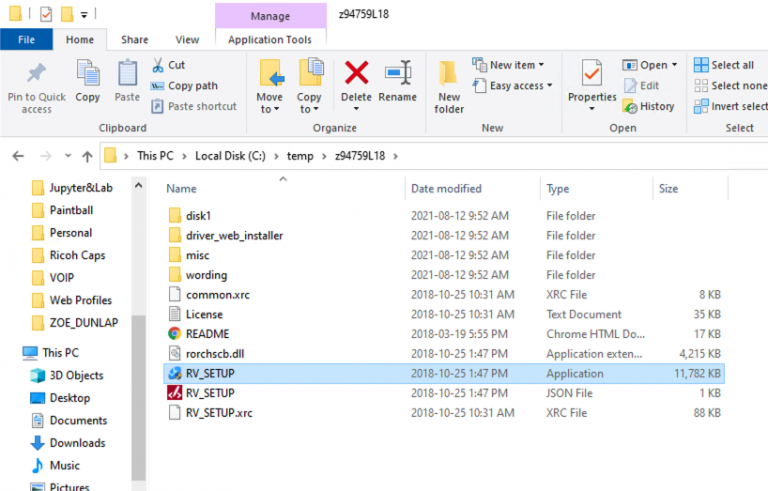
By default the files will extract to C:/temp, Navigate there and open folder “z94759L18″for IM C4500 and “z94761L18 for IM C3000 then click on file “RV_SETUP”
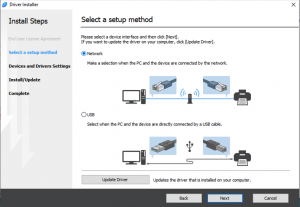
- Click on “Agree” then make sure you select “Network” in the next step
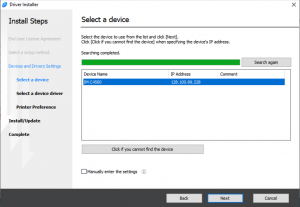
- It will show the IP address of the Ricoh printer (in this example we see the IM C4500’s IP listed). Select the printer and click “Next”
- The PCL 6 driver will install. On the final screen you will notice “Install Device Software Manager”, this is optional. Click next.
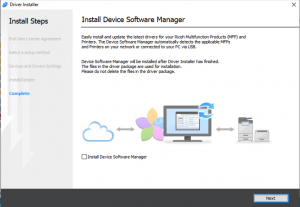
- Select “Finish” and view below for print code instructions
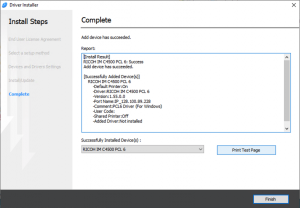
- Go to your search bar and type in “Control Panel”
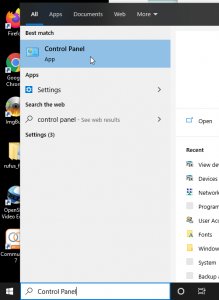
- Then click on “View Devices and Printers
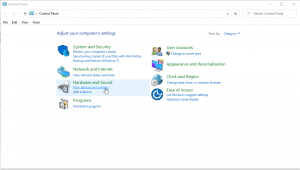
- Right click on the Ricoh printer and choose “Printer Preferences” then “Ricoh IM C4500/3000 PCL 6”

- Next click on the “Detailed Settings” tab and select “Job Setup”. You will see a box to enter in your 4 digit print code called “User Code”. Enter and click “Apply”
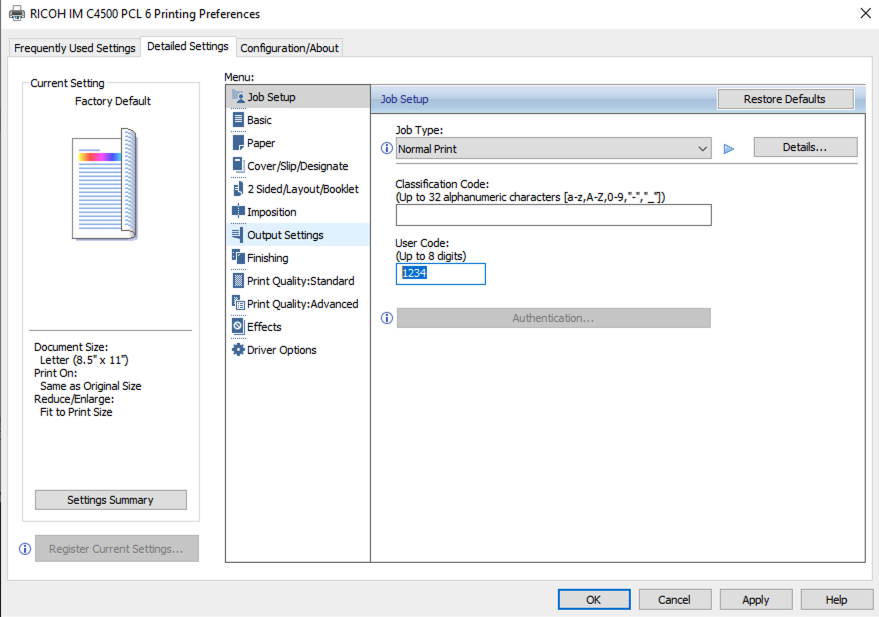
- Open the control panel
- Click on “Devices and Printers”
- At the top of the Devices and Printers window select “Add a printer”
- On the next window select “The printer that I want isn’t listed”
- Now choose “Add a printer using a TCP/IP address or hostname”
- In the “Hostname or IP address” type in 128.100.89.228 (port name the same)
- The printer will now install and you can enter in your usercode using the above instructions.
Print Codes
Once you have successfully installed the driver you will need to enter in a print code in order to print.
Alternative installation
Instructions for Mac OSX (10.7 and newer) Users
- Download, the driver package from Ricoh: Ricoh IM C4500 Ricoh IM C3000
(when here this page will automatically detect your OS vesion, scroll down to find the “PPD Installer” for your OS version)
- Extract and install the package using default settings
- Navigate to System Preferences > Printers and Scanners
- Click the + to add a new printer and click the IP tab at the top of the new window
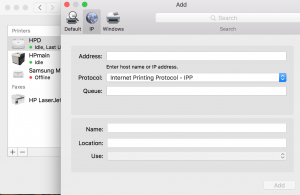
- In the Address field enter: 128.100.89.228
- Enter a name in the Name field to identify the new printer
- The “Use” should be set to “Auto Select”
- Click OK to finish adding.
Print Codes:
- Send a print job to the printer from an application like Acrobat, Reader, Word, web browser, etc.
- In the Print window, select the printer you have just added from the list
- At the bottom section use the drop-down list and select “Job Log” (pictured)
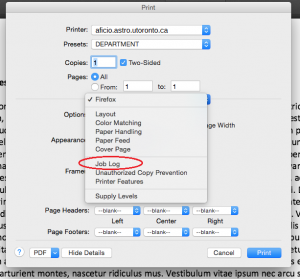
- Check the “Enable User Code” box and enter your 4 digit usercode in the field below
Recommended: Use the Presets field to copy a preset for each user code (personal, department, research).
Instructions for Linux Users
- Download the installation script: Ricoh IM C4500/Ricoh IM C3000
- Open a terminal and navigate to the download location
- Extract the package by entering:
tar xvf z94355en.tar - Navigate into the new directory: “Generic”
- Execute the install script by entering:
sudo ./unix_installer
If you do not have sudo access please contact stipe.milisa@dunlap.utoronto.ca or zhao@astro.utoronto.ca
- Follow any instructions the script returns with default options.
- Download the Ricoh PPD from here
- Copy the ppd file from the Printer Driver to the “/usr/share/cups/model” on the computer.
- Enter the command “/etc/init.d/cups restart”.
Ubuntu 22 – Adding a printer manually with IP
- Go to your setting and click on printers. Then click “Add Printer”
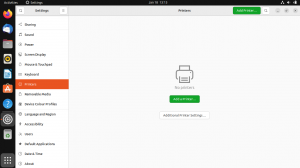
- Type in the printer IP as shown below
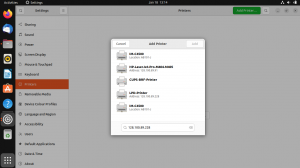
- Choose the IM-C4500 as shown in the figure below

- Choose option as indicated in figure below
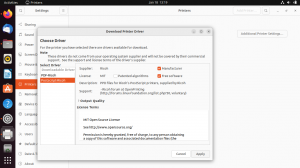
- Once applied please configure cups as directed in the instructions below
Entering your departmental User Code – Linux
After you have installed your print driver, please follow instructions below in order to set your printer departmental user codes (**you will need sudo/admin access to save settings**):
- Open a web browser and enter http://locahost:631
- Click on “Printers”

- Click on the desired printer

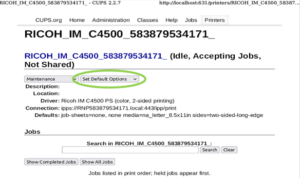
- Click on the circled menu in the image below and select “Set Default Options”
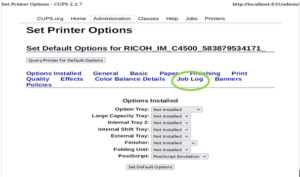
- Click on “Job Log”
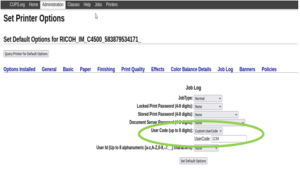
- Click on the “User Code (up to 8 digits):” menu and select “Custom UserCode”, then type in your 4 digit User Code and to finish click on “Set Default Options”. **you will need sudo/admin access to save settings**
- If you have any issues running this script or do not have sudo/admin access, please contact: stipe.milisa@dunlap.utoronto.ca
Ricoh Print Codes Explained
Ricoh Print Codes:
As you may know you have been assigned either 2 or 3 print codes in order to print on both our Ricoh printer. One located in the Astro building mail room and one on the 12th floor of the MP building located in the printer room.
If you are Staff you will be assigned 2 print codes, and receive and email like this.
| Dept & Teaching | Personal | |
| 2222 | 3333 |
One being “Dept & Teaching” and the other “personal”.
Everyone else (example: student, postdocs) will receive 3 print codes, “Research, “Departmental and Teaching”, and “Personal”.
You will receive and email that looks like this with your print codes.
| Research | Dept & Teaching | Personal |
| 1111 | 2222 | 3333 |
If you require any more information or need assistance please contact stipe.milisa@dunlap.utoronto.ca